Assign and Complete Alerts (MOP)
On Property Alerts (OPA) in MOP are used to flag items that require attention, follow-up, or verification. Assigning alerts ensures accountability, while completing alerts documents actions taken and supports operational visibility, safety tracking, audit history and compliance reporting.
What Are Alerts in MOP?On Property Alerts (OPA) are special task types designed to notify staff about important situations that require review or action.
Examples include:
- DND (Do Not Disturb) Alerts
- Suspicious Activity Alerts
- Manual operational alerts
- Safety-related alerts
Alerts typically:
- Require timely follow-up
- Are visible in the Alerts section
- May be assigned or completed by authorized users
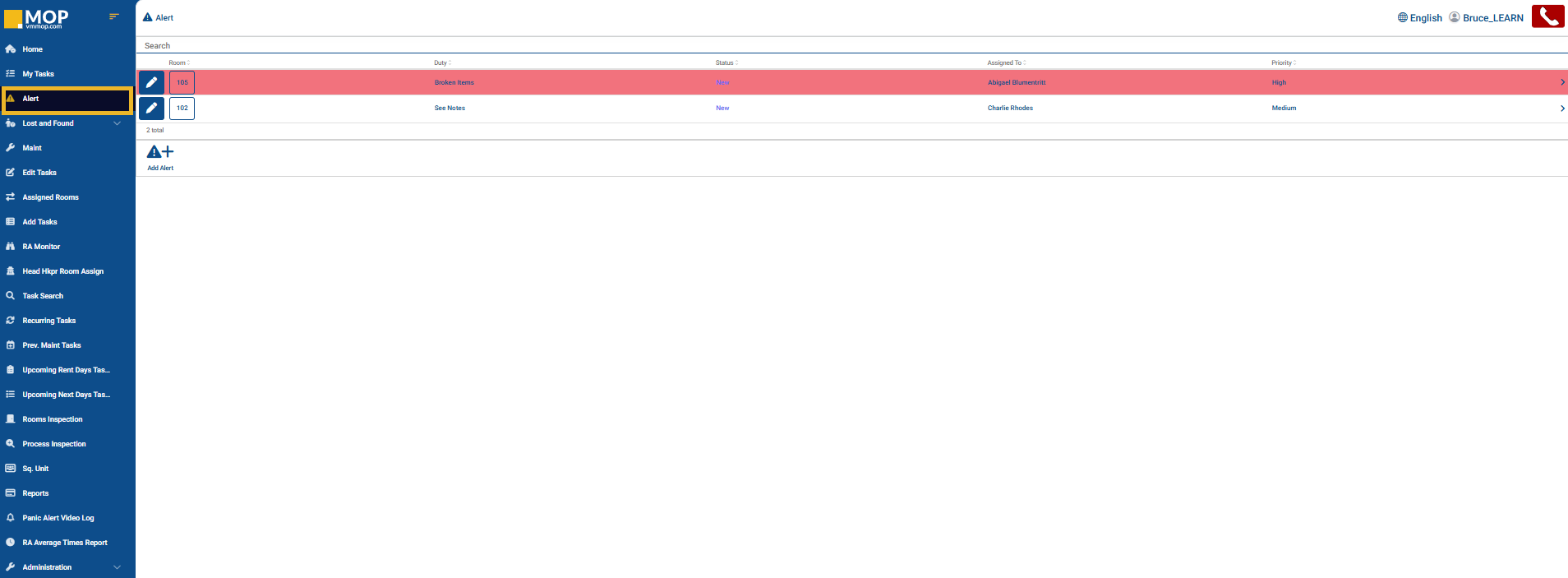
Assigning an AlertOn Property Alerts (OPA) can be assigned from the Alerts page or directly from the alert details view. Assigning alerts ensures the appropriate employee is responsible for follow-up and resolution.
Steps to assign an alert:
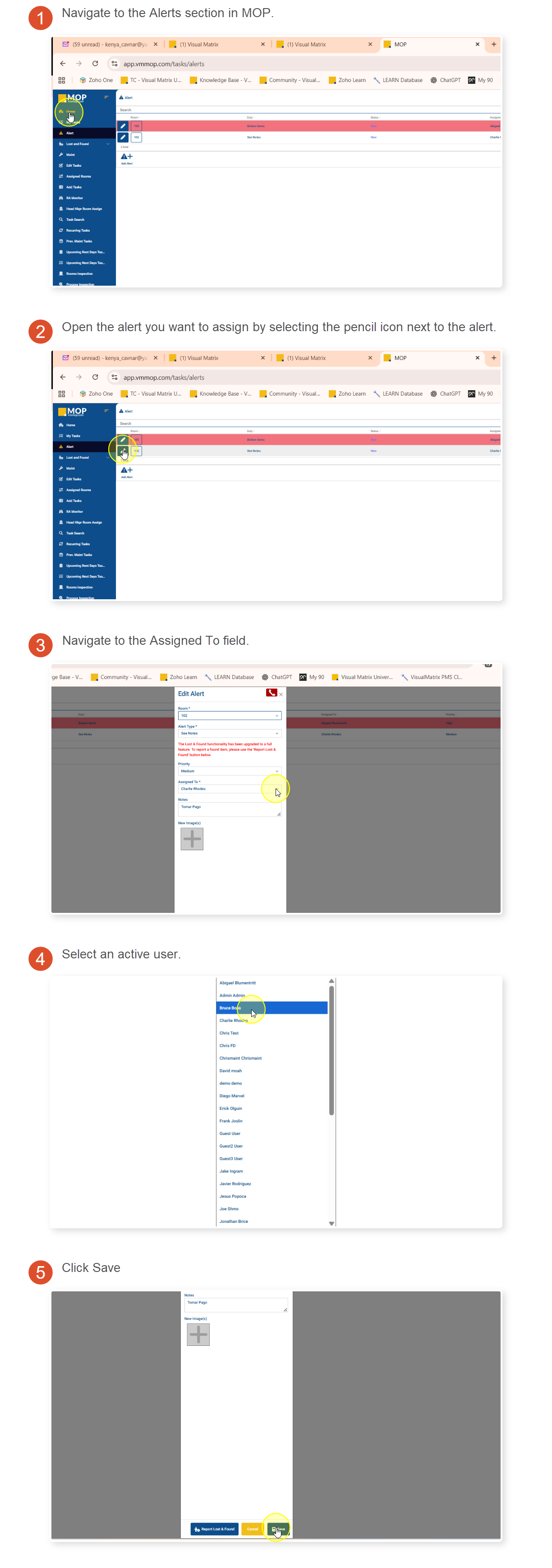
 Alerts can be reassigned if responsibilities change.Completing an AlertAlerts should only be completed after the required follow-up or investigation has been performed.
Steps to complete an alert:
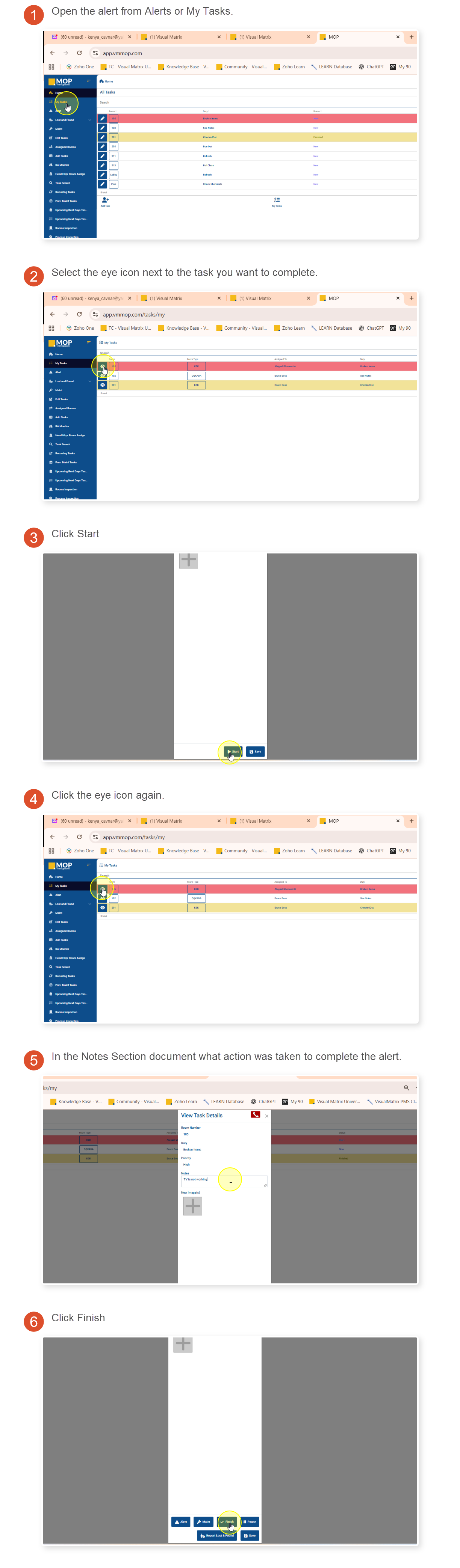 What Happens After Completion
After an alert is completed, the system records:
- Completed By (user who completed the alert)
- Completed Time
- Action Taken details
This information remains available for:
- Reporting
- Audits
- Safety reviews
- Compliance tracking
What Are Alerts in MOP?
On Property Alerts (OPA) are special task types designed to notify staff about important situations that require review or action.
Examples include:
- DND (Do Not Disturb) Alerts
- Suspicious Activity Alerts
- Manual operational alerts
- Safety-related alerts
Alerts typically:
- Require timely follow-up
- Are visible in the Alerts section
- May be assigned or completed by authorized users
Assigning an Alert
On Property Alerts (OPA) can be assigned from the Alerts page or directly from the alert details view. Assigning alerts ensures the appropriate employee is responsible for follow-up and resolution.
Steps to assign an alert:
Alerts can be reassigned if responsibilities change.
Completing an Alert
Alerts should only be completed after the required follow-up or investigation has been performed.
Steps to complete an alert:
What Happens After Completion
After an alert is completed, the system records:
- Completed By (user who completed the alert)
- Completed Time
- Action Taken details
This information remains available for:
- Reporting
- Audits
- Safety reviews
- Compliance tracking
Why Assigning and Completing Alerts Matters
Proper alert management helps properties:
- Improve accountability
- Track safety-related incidents
- Maintain operational transparency
- Ensure timely follow-up
- Preserve historical documentation
- Alerts can be reassigned if responsibilities change
- Verified alerts become read-only
- Action Taken notes should always be clear and detailed
- Completed alerts remain available in reporting and audit history
Still Need Help With This Topic?
Ask Yourself:
- Has the alert been assigned to the correct user?
- Was the required follow-up completed before marking the alert complete?
- Did I enter clear and accurate Action Taken notes?
- Am I reviewing the Completed By field correctly?
Support May Ask You:
- Which alert type is involved (DND, Suspicious Activity, manual task alert)?
- Who was the alert assigned to?
- Who completed the alert?
- Was Action Taken entered before completion?
- When was the alert completed?